深入理解React高阶组件

目前React组件实现组合的方式一般常见的有两种,一种是Mixins的方式,另外一种是高阶组件。

两者的对比

Mixins是通过混入的方式,向现有组件类添加逻辑。mixin,是将一个模块混入到一个另一个模块中,或是一个类中。它并不是react特有的,许多编程语言都有引入了mixins这样一种特性。事实上,包括C++等一些年龄较大的OOP语言,有一个强大但危险的多重继承特性。现代语言为了权衡利弊,大都舍弃了多重继承,只采用单继承。但单继承在实现抽象时有着诸多不便之处,为了弥补缺失,如Java就引入interface,其它一些语言引入了像Mixin的技巧,方法不同,但都是为创造一种 类似多重继承的效果,事实上说它是组合更为贴切。

高阶组件是通过函数的方式,向现有组件类添加逻辑。要理解高阶组件就要先知道高阶函数(Higher-Order function)。高阶函数在函数式编程是一个基本概念,它描述的是这样一种函数,接受函数作为输入,或是输出一个函数。比如常用的工具方法 map、reduce、sort 都是高阶函数。

相同点:都是为了向组件类增加功能。不同点:mixins直截了当,HOC温婉优雅。如果说mixins是面向对象的组合,HOC则是面向函数式编程的组合。

React Mixins

Mixins的两种用法

用法一

1
2
3
4
5
6
7
8
9
10
11
12
13
14
15
16
17
18
19
20
21
22
23
24
25
26
27
28
29
30
31
32
33
34
35
36
37
38
39
40
41
42
43
44
45
46
47
48
49
50
51
52
53
54
55
56
57
58
59
60
61
62
63
64
65
66
67
68
import React from 'react'
import ReactDOM from 'react-dom'
let MixinA = {
getDefaultProps: function () {
return {
aa: 'MixinA.props.aa',
bb: 'MixinA.props.bb'
}
},
getInitialState: function () {
return {
aa: 'MixinA.state.aa',
bb: 'MixinA.state.bb'
}
},
componentWillMount: function () {
console.log('MixinA---Component will mount');
},
componentDidMount: function () {
console.log('MixinA---Component did mount');
},
aa: function () {
this.bb()
}
}
let MixinB = {
componentWillMount: function () {
console.log('MixinB---Component will mount');
},
componentDidMount: function () {
console.log('MixinB---Component did mount');
}
}
let CompA = React.createClass({
mixins: [MixinA, MixinB],
getDefaultProps: function () {
return {
cc: 'compa.props.cc',
dd: 'compa.props.dd'
}
},
getInitialState: function () {
return {
cc: 'compa.state.cc',
dd: 'compa.state.dd'
}
},
componentWillMount: function () {
console.log('CompA---Component will mount');
},
componentDidMount: function () {
console.log('CompA---Component did mount');
},
bb: function () {
console.log('xxxxx')
},
render: function () {
console.log('CompA---Component props', this.props)
console.log('CompA---Component state', this.state)
this.aa()
return (
<div>
react mixins使用演示
</div>
)
}
})
ReactDOM.render(<CompA />, document.getElementById('root'))

用法二

1
2
3
4
5
6
7
8
9
10
11
12
13
14
15
16
17
18
19
20
21
22
23
24
25
26
27
28
29
30
31
32
33
34
35
36
37
38
39
40
41
42
43
44
45
46
47
48
49
50
51
52
53
54
55
56
57
58
59
60
61
62
63
64
65
66
67
68
69
70
71
72
import React from 'react'
import ReactDOM from 'react-dom'
import ReactMixin from 'react-mixin'

let MixinA = {
getDefaultProps: function () {
return {
aa: 'MixinA.props.aa',
bb: 'MixinA.props.bb'
}
},
getInitialState: function () {
return {
aa: 'MixinA.state.aa',
bb: 'MixinA.state.bb'
}
},
componentWillMount: function () {
console.log('MixinA---Component will mount');
},
componentDidMount: function () {
console.log('MixinA---Component did mount');
},
aa: function () {
this.bb()
}
}
let MixinB = {
componentWillMount: function () {
console.log('MixinB---Component will mount');
},
componentDidMount: function () {
console.log('MixinB---Component did mount');
}
}

class CompA extends React.Component {
constructor(props) {
super(props)
this.state = {
cc: 'compa.state.cc',
dd: 'compa.state.dd'
}
}
componentWillMount() {
console.log('CompA---Component will mount');
}
componentDidMount() {
console.log('CompA---Component did mount');
}
bb() {
console.log('At CompA dispatch function aa of MixinA and at MixinA dispatch function bb of CompA.')
}
render() {
console.log('CompA---Component props', this.props)
console.log('CompA---Component state', this.state)
this.aa()
return (
<div>
react mixins使用演示
</div>
)
}
}
CompA.defaultProps = {
cc: 'compa.props.cc',
dd: 'compa.props.dd'
}
ReactMixin.onClass(CompA, MixinA)
ReactMixin.onClass(CompA, MixinB)

ReactDOM.render(<CompA />, document.getElementById('root'))

优缺点

优点
我们能够通过在一个Mixin中维护这个共享的功能,来很容易的避免任何重复,而因此专注于只实现我们系统中真正彼此不同的功能。

缺点
在 React 中,Mixins 是传统的为 Component 进行扩展的做法。Mixins 的做法很像传统的命令式编程,即要扩展的组件决定需要哪些扩展(Mixins),以及了解所有扩展(Mixins)的细节,从而避免状态污染。当 Mixins 多了之后,被扩展组件需要维护的状态和掌握的”知识”越来越多,因此也就越来越难维护,因为责任都被交给了”最后一棒”(Last Responsible Moment)。

Mixins小结

目前几乎很少有人会使用React.createClass的方式使用React,JSX + ES6成了标配,React团队已经声明React.createClass最终会被React.Component的类形式所取代。用ES6来编写React组件的话,将不建议你使用React的mixin机制。
高阶组件(Higher order components)作为 mixin 之外的一种组件抽象与处理形式成为mixins在ES6下的替代方案。

React HOC

高阶组件(Higher-Order Components)就是一个函数,且该函数接受一个组件作为参数,并返回一个新的组件。

const EnhancedComponent = higherOrderComponent(WrappedComponent);

在React中的用法总结起来有两种:属性代理(Props Proxy)和反向继承(Inheritance Inversion)

属性代理(Props Proxy)

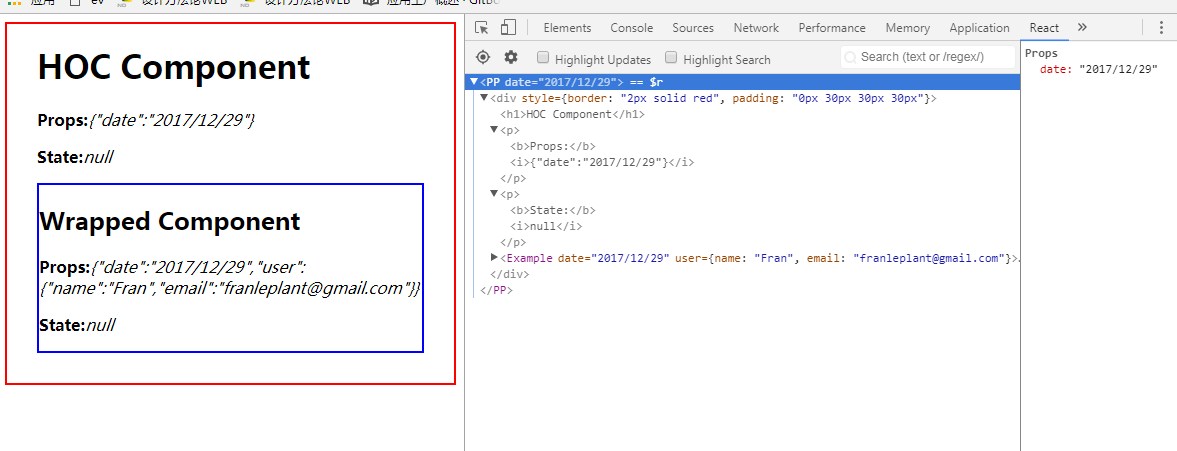
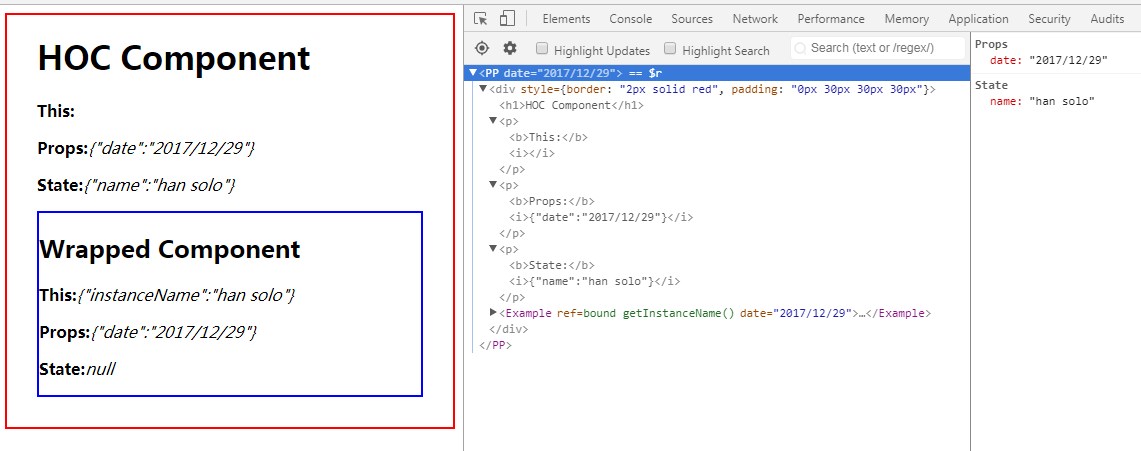
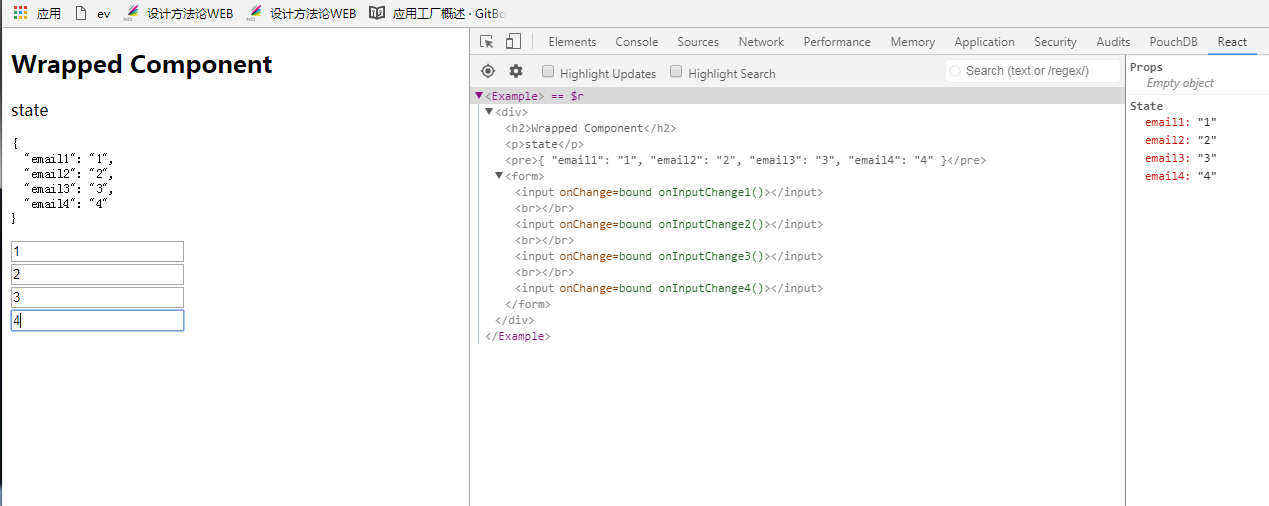
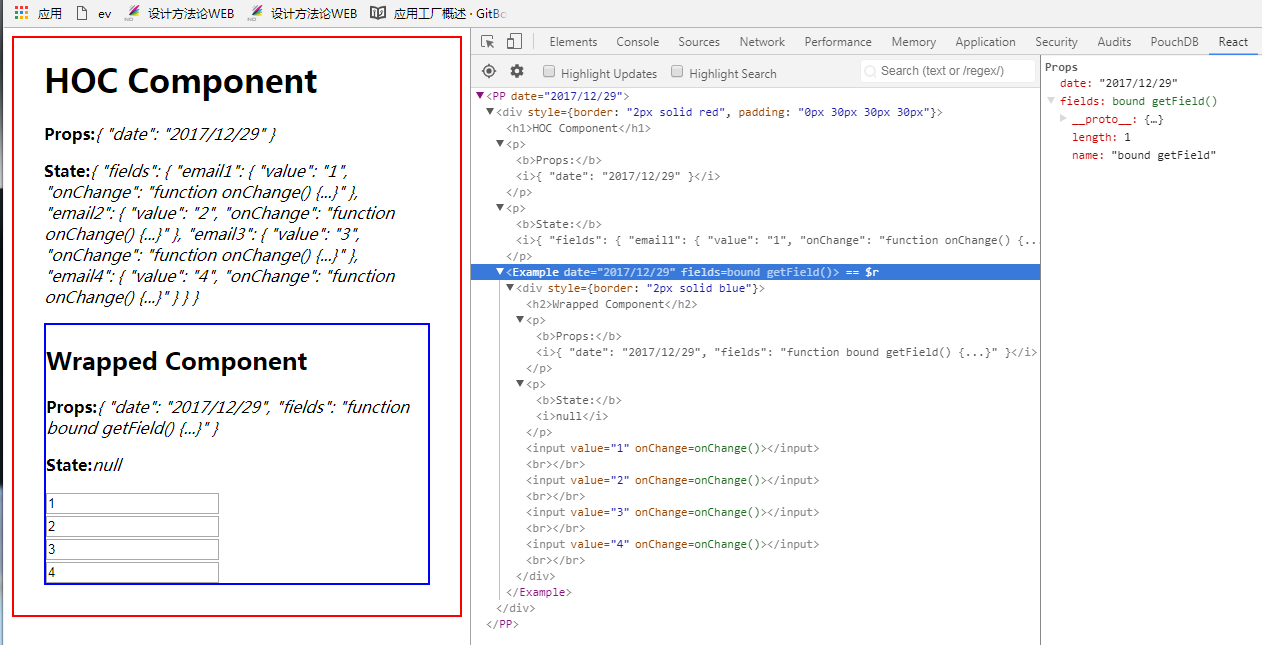
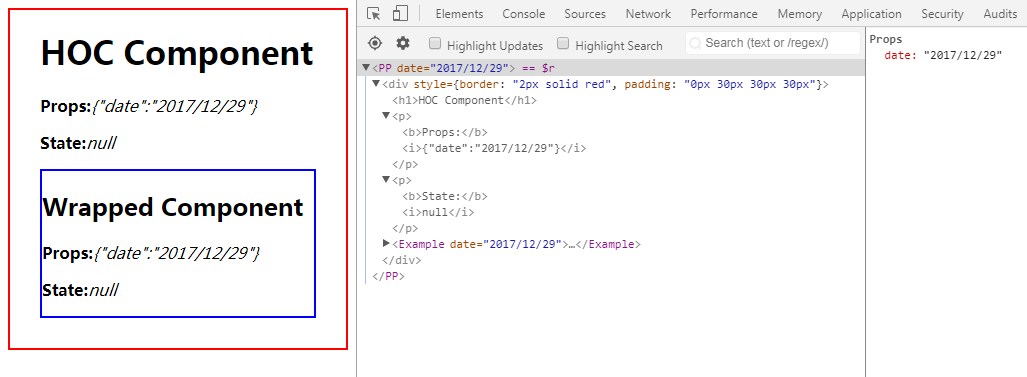
高阶组件操控传递给 WrappedComponent 的 props,大概有以下几种用法:包装元素、代理props、通过ref获取组件实例、抽象state

包装元素(wrapped elements)
1
2
3
4
5
6
7
8
9
10
11
12
13
14
15
16
17
18
19
20
21
22
23
24
25
26
27
import React from 'react'
import ReactDOM from 'react-dom'
function PPHOC(WrappedComponent) {
return class PP extends React.Component {
render() {
return (
<div style={{border: '2px solid red', padding: '0px 30px 30px 30px'}}>
<h1>HOC Component</h1>
<p><b>Props:</b><i>{JSON.stringify(this.props)}</i></p>
<p><b>State:</b><i>{JSON.stringify(this.state)}</i></p>
<WrappedComponent {...this.props}/>
</div>
)
}
}
}
class Example extends React.Component {
render() {
return (<div style={{border: '2px solid blue'}}>
<h2>Wrapped Component</h2>
<p><b>Props:</b><i>{JSON.stringify(this.props)}</i></p>
<p><b>State:</b><i>{JSON.stringify(this.state)}</i></p>
</div>)
}
}
const EnhancedExample = PPHOC(Example)
ReactDOM.render(<EnhancedExample date={(new Date).toLocaleDateString()}/>, document.getElementById('root'))

代理props

1
2
3
4
5
6
7
8
9
10
11
12
13
14
15
16
17
18
19
20
21
22
23
24
25
26
27
28
29
30
31
32
33
34
35
import React from 'react'
import ReactDOM from 'react-dom'
// Props Proxy demonstration
function PPHOC(WrappedComponent) {
return class PP extends React.Component {
render() {
const props = Object.assign({}, this.props, {
user: {
name: 'Fran',
email: 'franleplant@gmail.com'
}
})
return (<div style={{border: '2px solid red', padding: '0px 30px 30px 30px'}}>
<h1>HOC Component</h1>
<p><b>Props:</b><i>{JSON.stringify(this.props)}</i></p>
<p><b>State:</b><i>{JSON.stringify(this.state)}</i></p>
<WrappedComponent {...props} />
</div>)
}
}
}
class Example extends React.Component {
render() {
return (
<div style={{border: '2px solid blue'}}>
<h2>Wrapped Component</h2>
<p><b>Props:</b><i>{JSON.stringify(this.props)}</i></p>
<p><b>State:</b><i>{JSON.stringify(this.state)}</i></p>
</div>
)
}
}
// const EnhancedExample = Example
const EnhancedExample = PPHOC(Example)
ReactDOM.render(<EnhancedExample date={(new Date).toLocaleDateString()}/>, document.getElementById('root'))

通过ref获取组件实例

1
2
3
4
5
6
7
8
9
10
11
12
13
14
15
16
17
18
19
20
21
22
23
24
25
26
27
28
29
30
31
32
33
34
35
36
37
38
39
40
41
42
43
44
45
46
47
48
49
import React from 'react'
import ReactDOM from 'react-dom'
// Props Proxy with ref demonstration
function PPHOC(WrappedComponent) {
return class PP extends React.Component {
constructor(props) {
super(props)
this.state = {name: ''}
this.getInstanceName = this.getInstanceName.bind(this)
}
getInstanceName(instance) {
if (instance.instanceName !== this.state.name)
this.setState({name: instance.instanceName})
}
render() {
const props = Object.assign({}, this.props, {
ref: this.getInstanceName
})
return (
<div style={{border: '2px solid red', padding: '0px 30px 30px 30px'}}>
<h1>HOC Component</h1>
<p><b>This:</b><i></i></p>
<p><b>Props:</b><i>{JSON.stringify(this.props)}</i></p>
<p><b>State:</b><i>{JSON.stringify(this.state)}</i></p>
<WrappedComponent {...props}/>
</div>
)
}
}
}
class Example extends React.Component {
constructor(props) {
super(props)
this.instanceName = 'han solo'
}
render() {
return (
<div style={{border: '2px solid blue'}}>
<h2>Wrapped Component</h2>
<p><b>This:</b><i>{JSON.stringify({'instanceName': this.instanceName})}</i></p>
<p><b>Props:</b><i>{JSON.stringify(this.props)}</i></p>
<p><b>State:</b><i>{JSON.stringify(this.state)}</i></p>
</div>
)
}
}
// const EnhancedExample = Example
const EnhancedExample = PPHOC(Example)
ReactDOM.render(<EnhancedExample date={(new Date).toLocaleDateString()}/>, document.getElementById('root'))

抽象state

1
2
3
4
5
6
7
8
9
10
11
12
13
14
15
16
17
18
19
20
21
22
23
24
25
26
27
28
29
30
31
32
33
34
35
36
37
38
39
40
41
42
43
44
45
46
47
48
49
50
51
52
53
54
55
56
57
58
59
60
61
62
import React from 'react'
import ReactDOM from 'react-dom'
import {stringify} from '../ii/ii_debug'
class Example extends React.Component {
constructor(props) {
super(props)
this.state = {
email1: '',
email2: '',
email3: '',
email4: ''
}
this.onChange1 = this.onInputChange1.bind(this)
this.onChange2 = this.onInputChange2.bind(this)
this.onChange3 = this.onInputChange3.bind(this)
this.onChange4 = this.onInputChange4.bind(this)
}
onInputChange1(e) {
this.setState({
email1: e.target.value
})
}
onInputChange2(e) {
this.setState({
email2: e.target.value
})
}
onInputChange3(e) {
this.setState({
email3: e.target.value
})
}
onInputChange4(e) {
this.setState({
email4: e.target.value
})
}
render() {
return (
<div>
<h2>
Wrapped Component
</h2>
<p>
state
</p>
<pre>{stringify(this.state)}</pre>
<form>
<input onChange={this.onChange1}/>
<br />
<input onChange={this.onChange2}/>
<br />
<input onChange={this.onChange3}/>
<br />
<input onChange={this.onChange4}/>
</form>
</div>
)
}
}
const EnhancedExample = Example
ReactDOM.render(<EnhancedExample />, document.getElementById('root'))
1
2
3
4
5
6
7
8
9
10
11
12
13
14
15
16
17
18
19
20
21
22
23
24
25
26
27
28
29
30
31
32
33
34
35
36
37
38
39
40
41
42
43
44
45
46
47
48
49
50
51
52
53
54
55
56
57
58
59
60
61
62
63
import React from 'react'
import ReactDOM from 'react-dom'
import {IIHOC as DebuggerHOC, stringify} from '../ii/ii_debug'
// Props Proxy and state abstraction demonstration
function PPHOC(WrappedComponent) {
return class PP extends React.Component {
constructor(props) {
super(props)
this.state = {fields: {}}
}
getField(fieldName) {
if (!this.state.fields[fieldName]) {
this.state.fields[fieldName] = {
value: '',
onChange: event => {
this.state.fields[fieldName].value = event.target.value
this.forceUpdate()
}
}
}
return {
value: this.state.fields[fieldName].value,
onChange: this.state.fields[fieldName].onChange
}
}
render() {
const props = Object.assign({}, this.props, {
fields: this.getField.bind(this),
})
return (
<div style={{border: '2px solid red', padding: '0px 30px 30px 30px'}}>
<h1>HOC Component</h1>
<p><b>Props:</b><i>{stringify(this.props)}</i></p>
<p><b>State:</b><i>{stringify(this.state)}</i></p>
<WrappedComponent {...props}/>
</div>
)
}
}
}
class Example extends React.Component {
render() {
return (
<div style={{border: '2px solid blue'}}>
<h2>Wrapped Component</h2>
<p><b>Props:</b><i>{stringify(this.props)}</i></p>
<p><b>State:</b><i>{stringify(this.state)}</i></p>
<input {...this.props.fields('email1')}/>
<br />
<input {...this.props.fields('email2')}/>
<br />
<input {...this.props.fields('email3')}/>
<br />
<input {...this.props.fields('email4')}/>
<br />
</div>
)
}
}
const EnhancedExample = PPHOC(Example)
// 使用高阶组件作为调试器,来调试被包装组件的状态。
// const EnhancedExample = DebuggerHOC(PPHOC(Example))
ReactDOM.render(<EnhancedExample date={(new Date).toLocaleDateString()}/>, document.getElementById('root'))

反向继承(Inheritance Inversion)

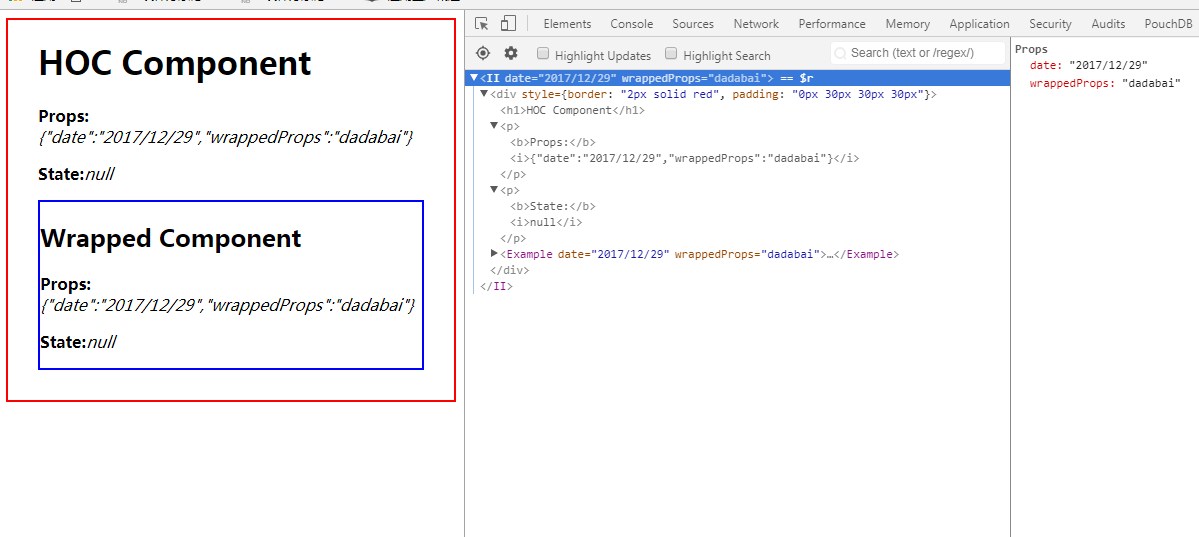
高阶组件 extends wrappedComponent。一般有以下几种用法:渲染劫持(Render Highjacking)、操作State或调试器
1
2
3
4
5
6
7
8
9
10
11
12
13
14
15
16
17
18
19
20
21
22
23
24
25
26
27
28
29
30
31
32
33
34
import React from 'react'
import ReactDOM from 'react-dom'
// Props Proxy demonstration
function IIHOC(WrappedComponent) {
// return class II extends React.Component {
return class II extends WrappedComponent {
render() {
return (<div style={{border: '2px solid red', padding: '0px 30px 30px 30px'}}>
<h1>HOC Component</h1>
<p><b>Props:</b><i>{JSON.stringify(this.props)}</i></p>
<p><b>State:</b><i>{JSON.stringify(this.state)}</i></p>
<WrappedComponent {...this.props}/>
{/* <WrappedComponent /> */}
</div>)
}
}
}
class Example extends React.Component {
render() {
return (
<div style={{border: '2px solid blue'}}>
<h2>Wrapped Component</h2>
<p><b>Props:</b><i>{JSON.stringify(this.props)}</i></p>
<p><b>State:</b><i>{JSON.stringify(this.state)}</i></p>
</div>
)
}
}
Example.defaultProps = {
wrappedProps: 'dadabai'
}
// const EnhancedExample = Example
const EnhancedExample = IIHOC(Example)
ReactDOM.render(<EnhancedExample date={(new Date).toLocaleDateString()}/>, document.getElementById('root'))

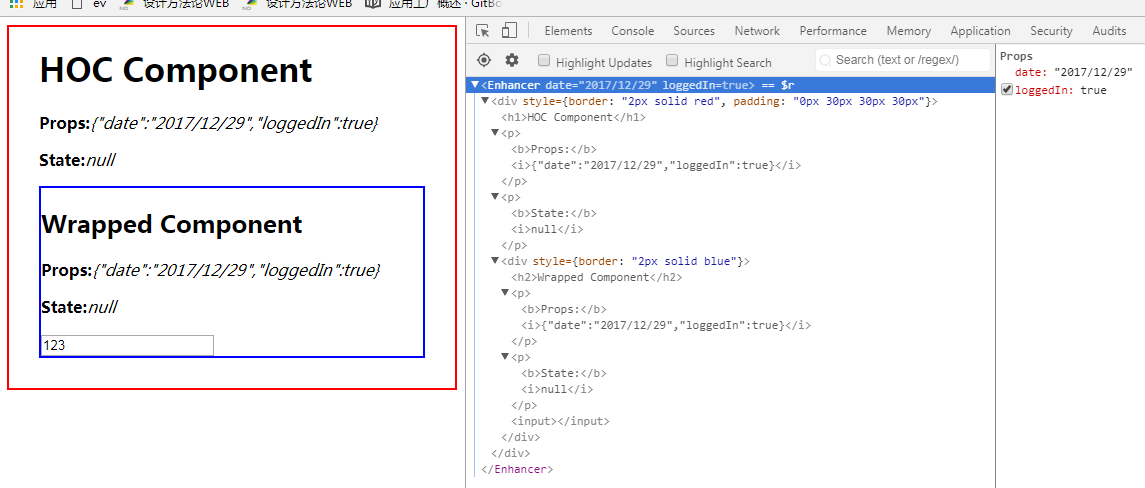
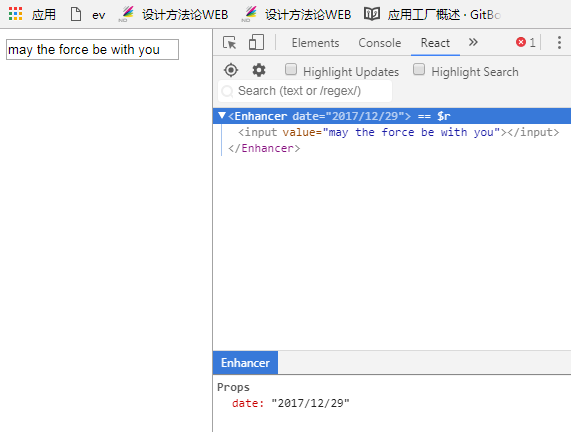
渲染劫持(Render Highjacking)

注意:不要在属性代理中渲染劫持,因为你必须在属性代理中模拟虚拟DOM的生命周期,而不是吧虚拟DOM的生命周期交给他原来的方式做。
1
2
3
4
5
6
7
8
9
10
11
12
13
14
15
16
17
18
19
20
21
22
23
24
25
26
27
28
29
30
31
32
33
34
import React from 'react'
import ReactDOM from 'react-dom'
function iiHOC(WrappedComponent) {
return class Enhancer extends WrappedComponent {
render() {
let childTreeDom
if (this.props.loggedIn) {
childTreeDom = super.render()
} else {
childTreeDom = null
}
return (<div style={{border: '2px solid red', padding: '0px 30px 30px 30px'}}>
<h1>HOC Component</h1>
<p><b>Props:</b><i>{JSON.stringify(this.props)}</i></p>
<p><b>State:</b><i>{JSON.stringify(this.state)}</i></p>
{childTreeDom}
</div>)
}
}
}
class Example extends React.Component {
render() {
return (
<div style={{border: '2px solid blue'}}>
<h2>Wrapped Component</h2>
<p><b>Props:</b><i>{JSON.stringify(this.props)}</i></p>
<p><b>State:</b><i>{JSON.stringify(this.state)}</i></p>
<input />
</div>
)
}
}
const EnhancedExample = iiHOC(Example)
ReactDOM.render(<EnhancedExample date={(new Date).toLocaleDateString()} loggedIn={true}/>, document.getElementById('root'))
1
2
3
4
5
6
7
8
9
10
11
12
13
14
15
16
17
18
19
20
21
22
23
24
25
26
27
28
29
30
import React from 'react'
import ReactDOM from 'react-dom'
function iiHOC(WrappedComponent) {
// return class Enhancer extends React.Component {
return class Enhancer extends WrappedComponent {
// componentWillMount(){

// }
render() {
const elementsTree = super.render()
// const newComponent = new WrappedComponent()
// const elementsTree = newComponent.render()
let newProps = {};
if (elementsTree && elementsTree.type === 'input') {
newProps = {value: 'may the force be with you'}
}
const props = Object.assign({}, elementsTree.props, newProps)
const newElementsTree = React.cloneElement(elementsTree, props, elementsTree.props.children)
return newElementsTree
}
}
}
class Example extends React.Component {
render() {
return (<input ></input>)
}
}
// const EnhancedExample = Example
const EnhancedExample = iiHOC(Example)
ReactDOM.render(<EnhancedExample date={(new Date).toLocaleDateString()}/>, document.getElementById('root'))

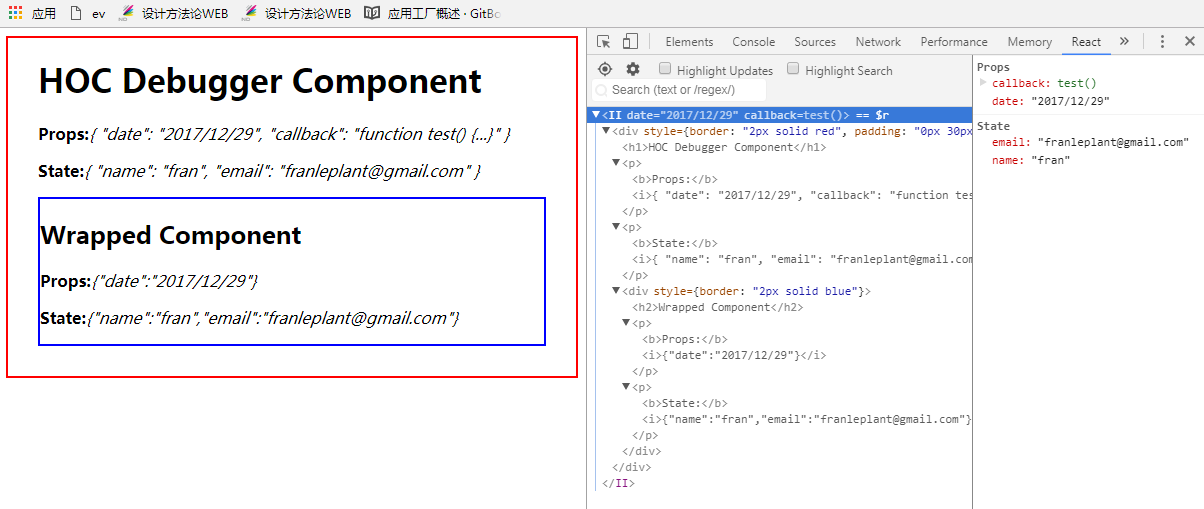
操作State或调试器

注意:不要在属性代理中操作state,只能抽象state。要在反向继承中操作state,不要在属性代理中抽象state
1
2
3
4
5
6
7
8
9
10
11
12
13
14
15
16
17
18
19
20
21
22
23
24
25
26
27
28
29
30
31
32
33
34
35
36
37
38
39
40
41
42
43
44
45
46
47
48
49
50
import React from 'react'
import ReactDOM from 'react-dom'
function replacer(key, value) {
if (typeof value === 'function') {
return `function ${value.name}() {...}`
}
return value
}
export function stringify(value) {
return JSON.stringify(value, replacer, 2)
}
// II debug example
// We are using the Inheritance Inversion technique to display
// the current state and props of the WrappedComponent (the component you want to debug).
// This is based on the technique that Mickael Jackson and Ryan Florence recommend
export function IIHOC(WrappedComponent) {
return class II extends WrappedComponent {
render() {
return (
<div style={{border: '2px solid red', padding: '0px 30px 30px 30px'}}>
<h1>HOC Debugger Component</h1>
<p><b>Props:</b><i>{stringify(this.props)}</i></p>
<p><b>State:</b><i>{stringify(this.state)}</i></p>
{super.render()}
</div>
)
}
}
}
class Example extends React.Component {
constructor(props) {
super(props)
this.state = {
name: 'fran',
email: 'franleplant@gmail.com'
}
}
render() {
return (
<div style={{border: '2px solid blue'}}>
<h2>Wrapped Component</h2>
<p><b>Props:</b><i>{JSON.stringify(this.props)}</i></p>
<p><b>State:</b><i>{JSON.stringify(this.state)}</i></p>
</div>
)
}
}
const EnhancedExample = IIHOC(Example)
ReactDOM.render(<EnhancedExample date={(new Date).toLocaleDateString()} callback={function test() {
}}/>, document.getElementById('root'))

HOC小结

约定

将不相关的props属性传递给包裹组件
高阶组件应该传递与它要实现的功能点无关的props属性。
向包裹组件注入props属性,一般都是高阶组件的state状态或实例方法。

最大化使用组合

1
2
3
const EnhancedComponent = connect(commentSelector)(withRouter(WrappedComponent))
const enhance = compose(connect(commentSelector),withRouter)
const EnhancedComponent = enhance(WrappedComponent)

包装显示名字以便于调试
当组件应用到高阶组件中后,显示的组件都一致,就无法发区分是那个wrapped组件被高阶组件包装了。所以要显示的指定displayName一般是“高阶组件名称+wrapped组件名称”。

注意事项

不要在render函数中使用高阶组件
每一次render函数调用都会创建一个新的EnhancedComponent实例。

必须将静态方法做拷贝
当使用高阶组件包装组件,原始组件被容器组件包裹,也就意味着新组件会丢失原始组件的所有静态方法。
可以使用hoist-non-react-statics来帮你自动处理,它会自动拷贝所有非React的静态方法。

refs属性不能传递
refs是一个伪属性,React对它进行了特殊处理。
如果你向一个由高级组件创建的组件的元素添加ref应用,那么ref指向的是最外层容器组件实例的,而不是包裹组件。
React在任何时候都不建议使用ref,如果真的要使用就必须多ref的函数有个清晰的认识,并在在高阶组件中代理实现它。

推荐用法

Props Proxy Inheritance Inversion
Props 建议使用 可以使用
State 建议抽象state 建议操作state
Ref 建议使用 可以使用
LifeCycle 不建议使用 建议使用

扩展延伸

HOC与设计模式

代理模式。属性代理就是参照了代理模式实现。
装饰者模式。高阶函数的用法就是装饰者模式,它不会破坏原来组件的功能,而是在原来的基础上进行扩展。

关联阅读

深入理解 React 高阶组件
http://www.jianshu.com/p/0aae7d4d9bc1

Facebook对高阶组件的官方文档
https://facebook.github.io/react/docs/higher-order-components.html

Mixins Considered Harmful
https://facebook.github.io/react/blog/2016/07/13/mixins-considered-harmful.html

Decorators in ES7
http://hackll.com/2015/07/24/decorators-in-es7/%0d